Most travel agencies don’t lose bookings because their itineraries are weak. They lose them because a lead messaged on WhatsApp at 9 PM, nobody followed up until the next afternoon, and by then the traveller had already paid a deposit somewhere else.
That’s the real cost of running a travel business without a proper system. It’s not a line item on any invoice, but it shows up every month in the deals that quietly disappear.
Finding the best CRM for travel agency operations has stopped being a “nice to have” and become a survival decision. The global CRM software market built specifically for travel agencies is projected to grow from $579 million in 2025 to $1.56 billion by 2032 – a 15.5% annual growth rate that reflects how many agencies are finally moving off spreadsheets and WhatsApp – only workflows.
This guide is built for travel agency owners, tour operators, DMCs, OTA founders, and corporate travel teams who are done guessing. You’ll get a real breakdown of features that matter, pricing models explained in plain language, a side-by-side comparison, a decision matrix you can score yourself, and a buyer’s checklist – so the CRM you choose actually fits how your business runs, not just how a sales demo makes it look.
Quick answer: The best travel CRM software combines travel – specific automation – lead capture, quotations, supplier and product management, booking history – with the communication channels travellers actually use, like WhatsApp and email, at pricing that scales with your team size rather than punishing you for growing.
Table of Contents
- What Is a Travel CRM?
- Why Travel Agencies Need a CRM in 2026
- Key Benefits of a Travel CRM
- Must – Have Features in a Travel CRM
- How AI Is Changing Travel CRM Software
- Travel CRM vs Spreadsheets vs Generic vs Custom Software
- How to Choose the Best CRM for Your Travel Agency
- Pricing Models and Hidden Costs
- Implementation Timeline and Common Mistakes
- Complete Buyer’s Checklist
- Expert Perspective
- Where OneX CRM Fits In
- Frequently Asked Questions
- Final Thoughts
What Is a Travel CRM?
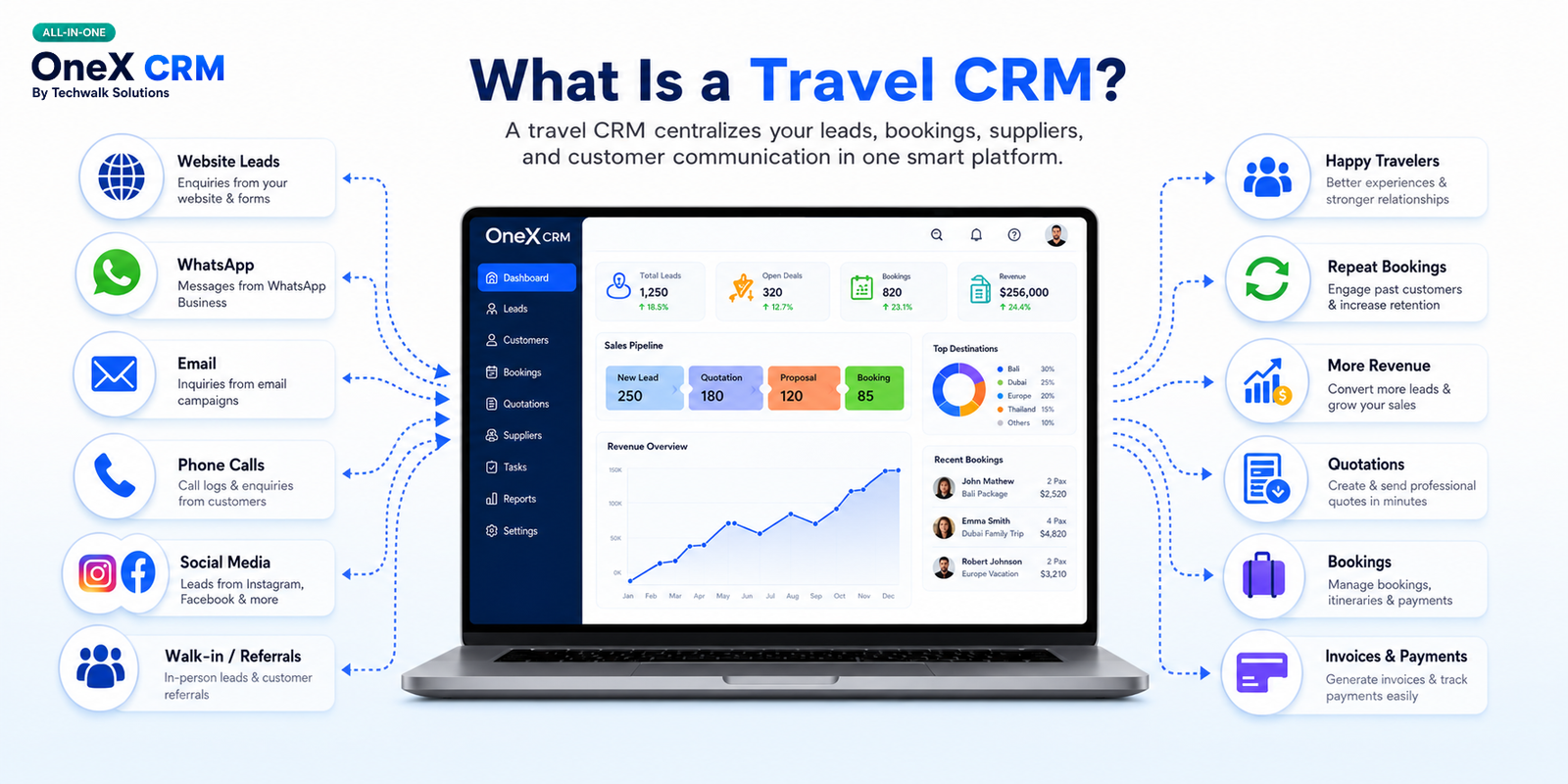
A travel CRM is software built specifically to help travel agencies, tour operators, and DMCs manage leads, bookings, supplier relationships, and customer communication from one centralized platform – instead of scattering that information across spreadsheets, personal inboxes, and WhatsApp chats.
Unlike a generic sales CRM, travel CRM software is designed around the actual shape of a travel business: inquiries that need fast quotations, itineraries built from multiple suppliers, payments split across deposits and balances, and repeat customers whose past trips matter to the next sale.
Think of it as the operational backbone that connects your sales team, your suppliers, and your customer history – so nothing depends on one person’s memory or a spreadsheet nobody else can find.
Key Takeaways
- A travel CRM centralizes leads, bookings, supplier data, and customer history in one system.
- It differs from generic CRMs by being pre – built around travel, with specific workflows like quotations and itinerary management.
- It replaces the fragmented mix of spreadsheets, email, and WhatsApp most agencies default to.
Why Travel Agencies Need a CRM in 2026
Travel buying behaviour has changed faster than most agency back offices have. Travellers now expect a quotation within hours, not days, and they’re comparing you against competitors who respond instantly.
Running a CRM for travel companies operations without a system creates predictable failure points:
- Leads go cold:
Inquiries arrive through Instagram DMs, WhatsApp, phone calls, and web forms – and without a central inbox, half of them never get a timely response.
- Quotations take too long:
Manually rebuilding an itinerary and price breakdown for every inquiry burns hours that should go toward selling.
- Customer history disappears:
When an agent leaves or a laptop breaks, the relationship history of hundreds of travellers can vanish with it.
- Reporting is guesswork:
Without a CRM, owners often can’t say which lead source, package, or agent is actually driving revenue.
- Growth becomes chaotic:
What works for one person managing 20 clients on a spreadsheet breaks completely at 200 clients across three team members.
None of these is software problems in the abstract – they’re revenue problems that happen to have a software fix.
Key Takeaways
- Traveller expectations for fast, personalized responses have made ad hoc systems unsustainable.
- The most common failure points without a CRM are slow follow-up, slow quotations, and lost customer history.
- These issues compound as an agency grows, not shrink.
Key Benefits of a Travel CRM
The right travel booking CRM doesn’t just organize data – it changes how a team sells and operates day-to-day.
- Faster response times: Centralized inquiries mean no lead sits unanswered because it landed in the wrong inbox.
- Higher conversion on quotations: Automated, branded quotations go out in minutes instead of hours.
- Better repeat business: Full booking history makes it easy to re – engage past travellers with relevant offers instead of generic blasts.
- Cleaner operations: Task management and reminders reduce the number of things that fall through the cracks between sales and fulfilment.
- Real visibility for owners: Reporting dashboards show which channels, packages, and team members are actually performing.
- Easier scaling: Onboarding a new agent takes hours, not weeks, because the process and history live in the system, not in someone’s head.
Expert Tip: If you can only fix one thing this year, fix lead response time. Industry-wide sales data consistently shows that the speed of the first reply is one of the strongest predictors of whether an inquiry converts – and it’s usually the cheapest problem a CRM solves.
Must – Have Features in a Travel CRM
Not every feature marketed as “travel CRM software” earns its place in your workflow. Here’s what genuinely moves the needle, and why.
1. Centralized Lead & Inquiry Management
What it is: A single inbox that captures leads from your website, WhatsApp, phone, email, and social channels.
Why it matters: Travel inquiries arrive from too many channels for any manual system to track reliably.
Business impact: Fewer leads slip through the cracks, and every agent can see the full inquiry history before responding.
Example: A lead who messages on Instagram, then emails a follow – up question, shows up as one contact – not two disconnected conversations.
2. Visual Sales Pipeline & Automated Quotations
What it is: A drag – and – drop pipeline showing every deal’s stage, paired with tools to generate quotations, invoices, and vouchers automatically.
Why it matters: Manually rebuilding itineraries and pricing for each inquiry is one of the biggest time sinks in a travel business.
Business impact: Quotations that used to take 30–45 minutes can go out in under 10, directly increasing how many leads a single agent can handle.
Example: An agent selects a package template, adjusts dates and pax count, and the system generates a branded PDF quotation instantly.
3. 360° Customer Profiles With Booking History
What it is: A complete record of each traveller’s past trips, preferences, payments, and communications.
Why it matters: Repeat and referral business depends on remembering details a spreadsheet can’t surface at the right moment.
Business impact: Agents can personalize upsells (“last time you loved the Bali villa upgrade”) instead of guessing.
4. Omnichannel Communication: Email and WhatsApp
What it is: Native integration with the channels travellers actually use to communicate, especially WhatsApp and email.
Why it matters: In most markets, travellers now expect to negotiate itineraries and receive vouchers over WhatsApp, not just email.
Business impact: Conversations and documents stay attached to the customer record instead of living in a personal phone that isn’t backed up.
5. Task, Appointment & Team Collaboration Tools
What it is: Shared task lists, appointment scheduling, and internal collaboration features that keep sales and operations aligned.
Why it matters: A booking involves handoffs – sales to documentation, documentation to accounts, accounts to the traveller – and handoffs are where things get dropped.
Business impact: Fewer missed follow-ups, fewer duplicated efforts, and a clear audit trail of who did what.
6. Product & Supplier Management
What it is: A structured database of your packages, hotels, transport partners, and other suppliers, with rates and availability.
Why it matters: Tour operators juggling dozens of suppliers need a single source of truth for pricing and inventory.
Business impact: Faster, more accurate quotations and fewer costly pricing errors caused by outdated supplier sheets.
7. Reporting & Analytics Dashboards
What it is: Real – time dashboards showing lead sources, conversion rates, and revenue by package, and team performance.
Why it matters: Owners can’t optimize what they measure, and gut – feel decisions get expensive and can’t scale.
Business impact: Marketing spend and staffing decisions get backed by data instead of assumptions.
8. Cloud – Based, Mobile Access
What it is: Access to the full CRM from any device, without needing to be at a desk.
Why it matters: Travel sales happen everywhere – trade shows, client meetings, and after-hours WhatsApp messages don’t wait for office hours.
Key Takeaways
- Lead management, automated quotations, and supplier data are the three features with the highest impact on revenue.
- Omnichannel communication (especially WhatsApp) is no longer optional in most travel markets.
- Reporting turns a CRM from a record-keeping tool into a decision – making tool.
How AI Is Changing Travel CRM Software
AI is moving from a marketing buzzword to a practical layer inside CRM software for travel agencies, though adoption is still uneven across the industry.
The clearest, already useful applications include:
- Smart lead scoring that flags which inquiries are most likely to convert based on past patterns, so agents prioritize their time.
- Auto-drafted quotations that pre – fill itinerary details based on a customer’s stated preferences and budget.
- Predictive follow-up reminders that suggest the best time to re – contact a lead who’s gone quiet.
- Sentiment flags on customer messages that surface frustrated or high-intent travellers before an agent even opens the thread.
Expert Tip: When evaluating “AI – powered” claims from any vendor, ask for a live demo of the specific feature rather than accepting it on a feature list. AI capability varies enormously between “genuinely automates a task” and “adds a chatbot nobody uses.” Not every CRM has mature AI features yet, and that’s fine – a travel CRM with excellent automation and reporting today is a safer bet than one selling AI promises it can’t yet demonstrate.
Travel CRM vs Spreadsheets vs Generic vs Custom Software
Every travel business is running one of four setups right now. Here’s how they actually compare.
| Criteria | OneX CRM (Travel – Specific) | Generic CRM (Salesforce/Zoho – type) | Custom-built CRM | Spreadsheets / Manual |
| Travel – specific features | Built – in: quotations, supplier management, bookings | Requires heavy customization or add-ons | Fully customizable, but built from scratch | None – manually recreated each time |
| Automation | Lead assignment, quotations, tasks, reminders | Strong general automation, needs travel – specific setup | Depends entirely on what’s built | Little to none |
| Pricing | Starts around ₹499/user/month* | Often $20–$150+/user/month plus add – ons | High upfront dev cost, ongoing maintenance | Low direct cost, high hidden labour cost |
| Lead management | Native, multi – channel | Strong, but not travel – tuned out of the box | Custom – built to spec | Manual tracking, easy to lose leads |
| Quotation & invoicing | Auto quotation, invoice, and voucher generation | Usually requires third – party integration | Custom – built if budgeted for | Fully manual, slow |
| Bookings | Centralized booking and supplier data | Possible with customization | Possible with customization | Scattered across files |
| Reporting | Built – in dashboards | Strong, generic reporting | Depends on build | Manual, error – prone |
| Scalability | Scales with per – user pricing | Scales well, cost rises with add-ons | Scales, but each change needs development | Breaks down past a small team |
| Ease of use | Designed for non – technical travel teams | Moderate learning curve | Depends on UX investment | Familiar, but manual |
| Support | Direct vendor support | Varies by plan tier | Depends on your dev team/agency | None – self – supported |
| AI capabilities | Automation – first; confirm current AI roadmap with vendor | Growing, often behind a premium tier | Only if specifically built in | None |
| Best use case | Small – to – mid travel agencies, tour operators, DMCs moving off manual systems | Larger businesses with dedicated CRM admins and budget for customization | Enterprises with unique workflows and dedicated dev resources | Solo agents or very early – stage startups only |
*Pricing shown reflects a promotional/entry – level rate at the time of writing; confirm current plans and billing terms directly with the vendor.
Key Takeaways
- Spreadsheets are the cheapest option upfront and the most expensive option in lost leads and wasted hours.
- Generic CRMs offer strong general features but need customization to fit travel – specific workflows.
- Custom-built CRMs make sense only when you have both the budget and a genuinely unique process.
- Travel-specific CRMs sit in the sweet spot for most small to mid-size agencies: purpose – built features without custom development cost.
How to Choose the Best CRM for Your Travel Agency
The right answer depends on where your business actually is today, not where you hope to be in three years. Here’s how that plays out in practice:
- Small travel agency (1–5 staff): Prioritize simplicity and fast setup over advanced customization. A cloud – based, per – user – priced CRM with quotation automation delivers the fastest return.
- Growing tour operator: Look for strong supplier and product management alongside the sales pipeline, since managing multiple packages and vendors becomes the bottleneck first.
- Multi – location agency: Team collaboration, role – based permissions, and centralized reporting across branches matter more than any single feature.
- Corporate travel company: Prioritize approval workflows, reporting granularity, and integration with expense or policy systems over consumer-facing features.
- Luxury travel consultant: Depth of customer profiles and communication history often matters more than automation volume, since the sales process is relationship – led and lower volume.
Beyond business size, weigh these questions honestly:
- What’s actually breaking in your current process? Buy for the specific bottleneck, not a feature list.
- Who will actually use this daily? A powerful CRM your team avoids because it’s confusing delivers zero ROI.
- How well does it match your sales channels? If most inquiries come through WhatsApp, a CRM without native WhatsApp integration will always feel like a workaround.
- What does it cost at your team size in twelve months? Per – user pricing that looks cheap at 3 users can look very different at 15.
Expert Tip: Before signing any contract, ask the vendor to walk through your actual last five real inquiries inside a demo environment. Generic demos hide friction that only shows up with your real workflow.
Pricing Models and Hidden Costs
Travel CRM pricing generally falls into three models:
- Per-user, per-month subscription: The most common model for SMB – focused travel CRMs, typically ranging from roughly ₹300–₹500 per user per month at the entry level, scaling with add-ons and team size.
- Tiered plans: Vendors bundle features into Starter/Growth/Enterprise tiers, where core features like quotation automation might be locked behind a higher tier.
- Custom/enterprise quotes: Larger tour operators and corporate travel companies often negotiate custom pricing tied to user count, transaction volume, or integration needs.
Watch for hidden costs that don’t show up on the pricing page:
- Implementation and onboarding fees, especially for data migration from spreadsheets or legacy systems.
- Per – integration charges for connecting WhatsApp Business, payment gateways, or accounting software.
- Storage or contact-limit overages once your customer database grows past an entry – tier cap.
- Support tier upgrades required to get priority response times during peak booking season.
Expert Tip: Always ask for the all – in monthly cost at your projected team size twelve months from now, not just today’s headcount. Travel CRMs that look inexpensive at 3 users can shift pricing brackets quickly as you scale.
Implementation Timeline and Common Mistakes
A realistic rollout for a small to mid-size travel agency looks like this:
- Week 1: Data migration: Export contacts, leads, and booking history from spreadsheets or your previous system; clean duplicates before importing.
- Week 1–2: Configuration: Set up your sales pipeline stages, quotation templates, and supplier database.
- Week 2: Team training: Run hands-on sessions using real inquiries, not sample data, so the workflow feels immediately relevant.
- Week 3 onward: Full adoption: Monitor usage, fix friction points, and retire the old spreadsheet completely. A partial migration where some agents keep using both systems is the most common way rollouts quietly fail.
Common mistakes buyers make:
- Buying based on a feature list instead of a live workflow demo.
- Skipping data cleanup before migration, which imports years of duplicate and outdated contacts.
- Under-training the team, leading to partial adoption and a slow return on the investment.
- Ignoring the total cost at scale, only to face a pricing shock once the team grows past the entry tier.
- Not assigning an internal owner for the rollout, so nobody is accountable when adoption stalls.
Migration checklist:
- ☐ Export and de-duplicate existing contacts and leads
- ☐ Map old spreadsheet columns to new CRM fields
- ☐ Import historical booking data where possible
- ☐ Set up supplier and package templates before go – live
- ☐ Run a parallel week where both systems are live, then fully cut over
- ☐ Archive (don’t delete) the old spreadsheet as a backup
Key Takeaways
- Most travel CRM rollouts take one to three weeks for small teams, longer for multi – location operations.
- Data cleanup before migration prevents the single most common source of frustration post – launch.
- Partial adoption, not the software itself, is the most common reason a CRM investment underperforms.
Complete Buyer’s Checklist
Before you sign anything, confirm the CRM you’re evaluating can answer “yes” to each of these:
- ☐ Does it support multi – channel lead capture, including WhatsApp?
- ☐ Can it generate a branded quotation, invoice, and voucher without manual formatting?
- ☐ Does it store complete customer and booking history in one profile?
- ☐ Can it manage your supplier and product database, not just customer data?
- ☐ Is pricing transparent at your team size, including likely add-ons?
- ☐ Is it cloud – based with mobile access for agents outside the office?
- ☐ Does it offer real reporting dashboards, not just raw data exports?
- ☐ What does onboarding and support actually look like in the first 30 days?
- ☐ Can you import your existing spreadsheet data without a costly migration project?
- ☐ Is there a free trial or live demo using your own sample data?
Expert Perspective
Working across travel technology rollouts for over two decades surfaces the same pattern again and again: agencies rarely fail at CRM adoption because of the software. They fail because they buy a tool that doesn’t match how their team actually sells, or they skip the unglamorous work of data cleanup and training.
The agencies that get real value from a CRM share three habits. They pick software matched to their actual sales channels – if WhatsApp drives most inquiries, that’s non – negotiable. They train the whole team on real workflows before go – live, not generic tutorials. And they review their reporting dashboard weekly, so the CRM becomes a decision – making habit instead of an expensive filing cabinet.
Professional recommendation: for most small to mid-size travel agencies and tour operators evaluating options in 2026, prioritize travel – specific automation and transparent per – user pricing over a long feature checklist. A CRM you and your team actually use consistently will always outperform a more powerful one that gathers dust after month two.
Where OneX CRM Fits In
If your agency is still running on spreadsheets, personal WhatsApp, and scattered email threads, OneX CRM by Techwalk Solutions is built specifically for that “offline to online” transition.
Its feature set covers the core workflow this guide has walked through:
- Lead Management and Sales Pipeline for centralized, trackable inquiries
- Customer Management with History for full booking and communication records
- Auto Quotation, Invoice & Voucher generation to cut manual document time
- Email and WhatsApp Integration for the channels travellers actually use
- Task Management, Appointment Scheduling, and Team Collaboration to keep handoffs from slipping
- Product & Supplier Management for centralized rates and inventory
- Reporting & Analytics for real visibility into what’s working
- Cloud – Based Access for agents working from anywhere
Entry – level plans start around ₹499 per user, positioned for small to mid-size travel agencies and tour operators that want travel – specific structure without enterprise pricing or a custom – development timeline. Terms and conditions apply to the current promotional rate, so confirm exact billing details directly with the OneX CRM team before signing up.
Where OneX CRM is a strong fit: agencies currently relying on spreadsheets or WhatsApp – only workflows that need to professionalize quotations, centralize leads, and get basic reporting in place quickly. Where it may not be the right fit: large corporate travel programs needing deep expense policy integrations, or businesses that require heavily bespoke workflows only a custom build can deliver – for those cases, the custom or enterprise – generic categories in the comparison table above are worth exploring instead.
Frequently Asked Questions
- What is the best CRM for a travel agency in 2026?
It depends on your business size and workflow, but strong options combine travel – specific automation – lead management, quotations, and supplier tracking – with the communication channels travellers use, like WhatsApp. Purpose – built tools such as OneX CRM are designed around these workflows rather than general sales processes.
- How much does a travel CRM cost?
Travel CRM pricing typically ranges from around ₹300–₹500 per user per month for SMB – focused tools up to $100 or more per user for enterprise platforms. Custom – built systems carry higher upfront development costs plus ongoing maintenance.
- Is a travel CRM different from a general CRM like Salesforce or Zoho?
Yes. General CRMs manage broad sales pipelines, while a travel CRM is pre – built around travel – specific workflows – itinerary quotations, supplier management, and booking history – reducing the customization travel agencies would otherwise need.
- How long does it take to implement a travel CRM?
Most cloud – based travel CRMs can be set up within one to two weeks for a small agency, including data migration and training. Larger or multi – location operations with complex supplier networks should plan for three to six weeks for full adoption.
- Do small travel agencies really need a CRM?
Yes. Small agencies often lose the most revenue to missed follow-ups, since owners juggle sales, operations, and service personally. A CRM automates reminders and centralizes history so leads don’t slip through WhatsApp or email inboxes.
- Can a travel CRM integrate with WhatsApp?
Many modern travel CRMs, including OneX CRM, offer built – in WhatsApp integration so agents can manage inquiries and send quotations directly from the CRM, since WhatsApp is now a primary booking channel in many markets.
- What features should I look for in a travel CRM?
Prioritize lead management, an automated sales pipeline, quotation and invoicing tools, customer history, supplier and product management, reporting dashboards, and cloud-based access; these address the day-to-day bottlenecks agencies face without a dedicated system.
- Is cloud – based travel CRM secure for customer data?
Reputable cloud – based CRMs use encrypted storage and role – based access controls, generally safer than spreadsheets shared over email or WhatsApp. Always confirm a vendor’s specific security and backup practices before signing up.
- Can I migrate from spreadsheets to a travel CRM easily?
Most travel CRMs support CSV or Excel imports for contacts and booking history, making migration straightforward. Plan for a short data-cleaning phase first, since duplicate or outdated entries are the most common migration headache.
- What’s the difference between a generic CRM and tour operator CRM software?
A generic CRM manages contacts and deals but needs heavy customization for travel workflows. Tour operator CRM software comes pre – built with quotations, supplier management, and booking – specific pipelines, cutting setup time significantly.
Final Thoughts
The travel agencies pulling ahead in 2026 aren’t necessarily the ones with the biggest marketing budgets – they’re the ones responding to leads faster, quoting more professionally, and never losing a customer’s history because someone’s laptop crashed.
A CRM won’t fix a broken sales process on its own, but it removes the operational friction that keeps a good process from scaling. Use the checklist and decision matrix above with your top two or three options, score them honestly against your actual workflow, and choose the one your team will genuinely use every day.
If you’re currently running your agency on spreadsheets and WhatsApp and want to see what a travel – specific system looks like in practice, book a free demo with OneX CRM, request a consultation, or start a trial to test it against your own real inquiries before committing. You can reach the OneX CRM team directly at +91 – 8360737449 or via www.techwalksol.com.